
Welcome to BMW Tech Talk – your go-to series for exploring the clever technology tucked inside BMW motorcycles. From hidden features to smart tips and tricks, we’ll show you how to unlock the full potential of your bike and make every ride that little bit more exciting. Whether you’re a GS adventurer, a roadster rider, or simply curious about what your BMW can really do, you’re in the right place!
If you ride a BMW R1250GS or GS Adventure, you might be surprised to learn that your bike’s instrument cluster has extra display modes built in — but they’re hidden. These include alternative startup graphics, a lap timer, lean angle readouts, and even brake force data.
The problem? These options aren’t enabled from the factory. That means many riders never get to see, let alone enjoy, these features.
That’s where the HEX GS-911 Diagnostics & Configuration Tool comes in. With the GS-911, you can easily activate the BMW SPORT functionality on most R1250GS dashboards. No special dealer visit required. No waiting around for service appointments, no unexpected costs.
In just a few minutes, you can give your display a fresh new look and gain access to performance-focused information that enhances your riding experience.
The benefits go beyond the fun factor, too. By using the HEX GS-911 at home, you save valuable time and avoid any additional expense. Over time, the tool pays for itself, while also giving you the freedom to manage a wide range of diagnostic and configuration tasks whenever you like.
The HEX GS-911 makes it quick, simple, and affordable to unlock features you didn’t even know you had.
Whether you’re looking for extra split-seconds on the track, or you want a more engaging display, unlocking SPORT mode gives you that extra connection to your bike, and extra edge among your riding buddies.
If you’ve ever wondered whether your BMW’s display can work harder and do more – now you know. With GS-911, there’s always more to discover.
If you ride a BMW motorcycle with heated grips, you’ll know the familiar two-setting system — one often feels like overkill, while the other leaves your hands cold. It’s a classic case of compromise… but with the HEX GS-911 Diagnostics & Configuration Tool, that compromise disappears.
The HEX GS-911 allows you to unlock up to six separate heat levels for your BMW’s heated grips. Better yet, you can fine-tune the actual temperature for each level, creating the ideal setup for every ride and condition.
Whether you’re carving through frosty winter mornings or enjoying a crisp spring ride, you can set your heat precisely how you like it. And because all adjustments can be made directly via the HEX GS-911, there’s no need to visit a dealer or pay workshop fees — just plug in, configure, and ride.
This isn’t just a comfort upgrade; it’s about control. The HEX GS-911 empowers riders to tailor their bikes to their own needs — from diagnostics to convenience features — saving time, money, and effort in the process.
Anti-lock braking systems (ABS) are now standard on all modern BMW motorcycles, and they’re an essential part of rider safety. But there’s one detail that often gets overlooked: if the brake system is ever unsealed — for example, during a fluid change — air can enter. Once it does, it’s virtually impossible to remove the air completely by hand.
It’s important to use the right tools for the job. And with the HEX GS-911 Diagnostics & Configuration Tool, you can run the factory ABS bleed procedure in just a few minutes. This ensures the system is properly purged, leaving your brakes safe, sharp, and reliable.
The advantages go beyond safety, too. Running the ABS bleed procedure at home with your GS-911 saves you a trip to the dealer. No more waiting for service appointments, no more paying workshop fees for something you can do yourself. That means more time on the road, more money in your pocket, and complete confidence that your braking system is working as it should.
The HEX GS-911 doesn’t just give you control over diagnostics and customisation — it also helps you address the fundamentals that keep your bike safe.
It’s a straightforward way to make sure your motorcycle’s brakes are performing safely, so you can focus on the ride ahead.
The life of every GS-911 device starts with registration. This activates your device, marks the start of the warranty period and requires an internet connection.
Register the device using the [Registration] link in the application main menu and provide your user details in the opened browser window.
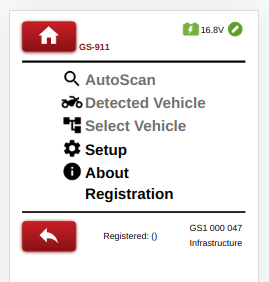
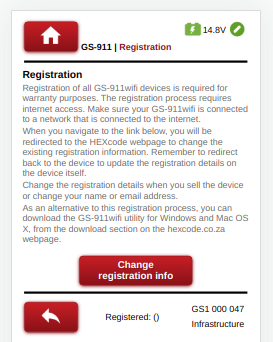
First configure the device to connect in Infrastructure mode as described in section 4, then register the device using the [Registration] link in the application main menu.
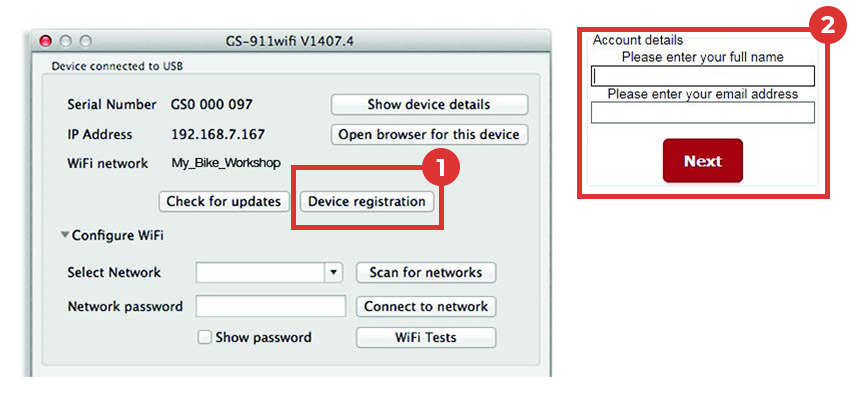
The GS-911wifi utility app should detect a USB connected device and display its serial number. The (1)[Device registration] button opens the (2)registration page in your browser.
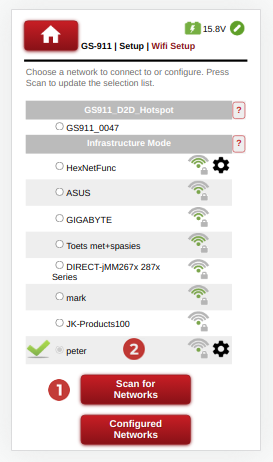
Navigate to Setup->Wifi Setup.
Press the (1)[Scan for Networks] button to refresh the detected WiFi list or (2) choose the desired WiFi access point.
Type the required (3) network password and select the (4)[Connect] button to connect.
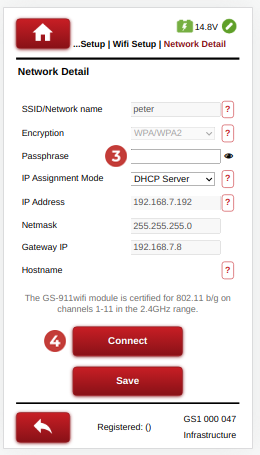
Ensure the GS-911 WiFi device is in D2D mode and connect your phone to the GS-911 device’s Access Point / Hotspot. The WiFi network will start with GS911_ and end with the last 4 digits of the GS-911 device’s serial number.
Use the GS-911 WiFi App to locate the GS-911 device or browse to http://10.0.0.1
Configure an Infrastructure connection similar to the Diagnostic App.
On the GS-911wifi Utility app window, expand the [Configure WiFi] section.
Click the (1) [Scan for networks] button. It will list all the (2) WiFi networks that have been found in the range of your GS-911wifi device. Select your network SSID and enter the (3) WiFi network password , then click the (4) [Connect to network] button to join this network.
The top section of the GS-911wifi Utility (5) will show the WiFi network to which your device is connected.
The ‘devices detected on WiFi section’ (6) will display the serial and IP numbers of all connected GS-911wifi devices. Click the [Refresh device list] button to see an updated list. Then select the device to open a browser.



Carry out an AutoScan with your GS-911wifi as a first diagnostic task.
Visit our YouTube channel or the videos page for various instructional videos.
Download the GS-911 Diagnostics application from the Downloads page and run it.
The life of every GS-911 device starts with registration. This activates your device, marks the start of the warranty period and requires an internet connection.
Carry out an AutoScan with your GS-911 as a first diagnostic task.
Visit our YouTube channel or the videos page for various instructional videos.