
Welcome to BMW Tech Talk – your go-to series for exploring the clever technology tucked inside BMW motorcycles. From hidden features to smart tips and tricks, we’ll show you how to unlock the full potential of your bike and make every ride that little bit more exciting. Whether you’re a GS adventurer, a roadster rider, or simply curious about what your BMW can really do, you’re in the right place!
If you ride a BMW R1250GS or GS Adventure, you might be surprised to learn that your bike’s instrument cluster has extra display modes built in — but they’re hidden. These include alternative startup graphics, a lap timer, lean angle readouts, and even brake force data.
The problem? These options aren’t enabled from the factory. That means many riders never get to see, let alone enjoy, these features.
That’s where the HEX GS-911 Diagnostics & Configuration Tool comes in. With the GS-911, you can easily activate the BMW SPORT functionality on most R1250GS dashboards. No special dealer visit required. No waiting around for service appointments, no unexpected costs.
In just a few minutes, you can give your display a fresh new look and gain access to performance-focused information that enhances your riding experience.
The benefits go beyond the fun factor, too. By using the HEX GS-911 at home, you save valuable time and avoid any additional expense. Over time, the tool pays for itself, while also giving you the freedom to manage a wide range of diagnostic and configuration tasks whenever you like.
The HEX GS-911 makes it quick, simple, and affordable to unlock features you didn’t even know you had.
Whether you’re looking for extra split-seconds on the track, or you want a more engaging display, unlocking SPORT mode gives you that extra connection to your bike, and extra edge among your riding buddies.
If you’ve ever wondered whether your BMW’s display can work harder and do more – now you know. With GS-911, there’s always more to discover.
If you ride a BMW motorcycle with heated grips, you’ll know the familiar two-setting system — one often feels like overkill, while the other leaves your hands cold. It’s a classic case of compromise… but with the HEX GS-911 Diagnostics & Configuration Tool, that compromise disappears.
The HEX GS-911 allows you to unlock up to six separate heat levels for your BMW’s heated grips. Better yet, you can fine-tune the actual temperature for each level, creating the ideal setup for every ride and condition.
Whether you’re carving through frosty winter mornings or enjoying a crisp spring ride, you can set your heat precisely how you like it. And because all adjustments can be made directly via the HEX GS-911, there’s no need to visit a dealer or pay workshop fees — just plug in, configure, and ride.
This isn’t just a comfort upgrade; it’s about control. The HEX GS-911 empowers riders to tailor their bikes to their own needs — from diagnostics to convenience features — saving time, money, and effort in the process.
Anti-lock braking systems (ABS) are now standard on all modern BMW motorcycles, and they’re an essential part of rider safety. But there’s one detail that often gets overlooked: if the brake system is ever unsealed — for example, during a fluid change — air can enter. Once it does, it’s virtually impossible to remove the air completely by hand.
It’s important to use the right tools for the job. And with the HEX GS-911 Diagnostics & Configuration Tool, you can run the factory ABS bleed procedure in just a few minutes. This ensures the system is properly purged, leaving your brakes safe, sharp, and reliable.
The advantages go beyond safety, too. Running the ABS bleed procedure at home with your GS-911 saves you a trip to the dealer. No more waiting for service appointments, no more paying workshop fees for something you can do yourself. That means more time on the road, more money in your pocket, and complete confidence that your braking system is working as it should.
The HEX GS-911 doesn’t just give you control over diagnostics and customisation — it also helps you address the fundamentals that keep your bike safe.
It’s a straightforward way to make sure your motorcycle’s brakes are performing safely, so you can focus on the ride ahead.
Das Leben eines jeden GS-911-Geräts beginnt mit der Registrierung. Dies aktiviert Ihr Gerät, markiert den Beginn der Garantiezeit und erfordert eine Internetverbindung.
Registrieren Sie das Gerät über den Link [Registrierung] im Hauptmenü der Anwendung und geben Sie Ihre Benutzerdaten im geöffneten Browserfenster ein.
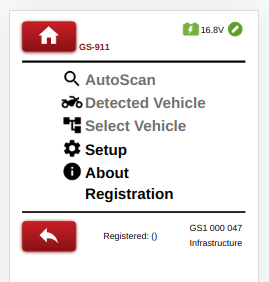
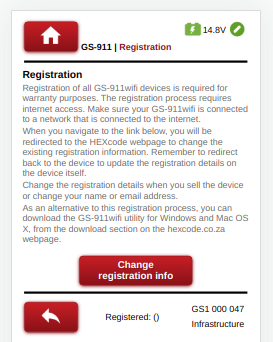
Konfigurieren Sie das Gerät zunächst für die Verbindung im Infrastrukturmodus, wie in Abschnitt 4 beschrieben, und registrieren Sie das Gerät dann über den Link [Registrierung] im Hauptmenü der Anwendung.
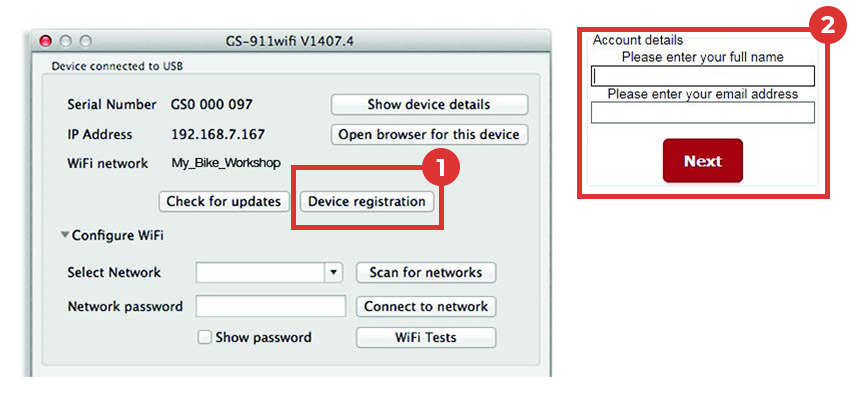
Die GS-911wifi Utility-App sollte ein über USB angeschlossenes Gerät erkennen und dessen Seriennummer anzeigen. Die Schaltfläche (1)[Geräteregistrierung] öffnet die Registrierungsseite (2)in Ihrem Browser.
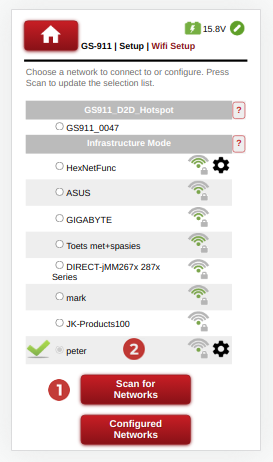
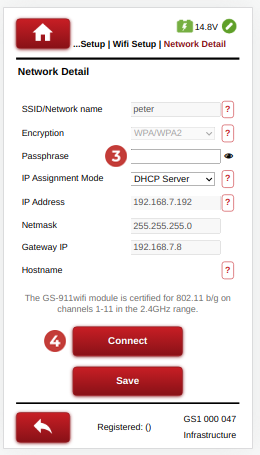
Navigieren Sie zu Setup->Wifi Setup.
Drücken Sie die Taste (1)[Nach Netzwerken suchen], um die Liste der erkannten WiFi-Netzwerke zu aktualisieren, oder (2) wählen Sie den gewünschten WiFi-Zugangspunkt.
Geben Sie das erforderliche (3) Netzwerkpasswort ein und wählen Sie die Schaltfläche (4)[Verbinden], um eine Verbindung herzustellen.
Vergewissern Sie sich, dass sich das GS-911 WiFi-Gerät im D2D-Modus befindet und verbinden Sie Ihr Telefon mit dem Access Point/Hotspot des GS-911-Geräts. Das WiFi-Netzwerk beginnt mit GS911_ und endet mit den letzten 4 Ziffern der Seriennummer des GS-911-Geräts.
Verwenden Sie die GS-911 WiFi App, um das GS-911 Gerät zu lokalisieren, oder besuchen Sie http://10.0.0.1
Konfigurieren Sie eine Infrastrukturverbindung ähnlich wie bei der Diagnose-App.
Erweitern Sie im Fenster der GS-911wifi Utility App den Abschnitt [Configure WiFi].
Klicken Sie auf die Schaltfläche (1) [Nach Netzwerken suchen]. Es werden alle (2) WiFi-Netzwerke aufgelistet, die in der Reichweite Ihres GS-911wifi-Geräts gefunden wurden. Wählen Sie Ihre Netzwerk-SSID und geben Sie das (3) WiFi-Netzwerk-Passwort ein, dann klicken Sie auf die Schaltfläche (4) [Mit Netzwerk verbinden], um diesem Netzwerk beizutreten.
Im oberen Bereich des GS-911wifi-Dienstprogramms (5 ) wird das WiFi-Netzwerk angezeigt, mit dem Ihr Gerät verbunden ist.
Im Abschnitt "Devices detected on WiFi" (6 ) werden die Serien- und IP-Nummern aller angeschlossenen GS-911wifi-Geräte angezeigt. Klicken Sie auf die Schaltfläche [Geräteliste aktualisieren], um eine aktualisierte Liste anzuzeigen. Wählen Sie dann das Gerät aus, um einen Browser zu öffnen.



Führen Sie einen AutoScan mit Ihrem GS-911wifi als erste Diagnoseaufgabe durch.
Besuchen Sie unseren YouTube-Kanal oder die Seite mit den Videos für verschiedene Lehrvideos.
Laden Sie die Anwendung GS-911 Diagnostics von der Seite Downloads herunter und führen Sie sie aus.
Das Leben eines jeden GS-911-Geräts beginnt mit der Registrierung. Dies aktiviert Ihr Gerät, markiert den Beginn der Garantiezeit und erfordert eine Internetverbindung.
Führen Sie als erste Diagnosemaßnahme einen AutoScan mit Ihrem GS-911 durch.
Besuchen Sie unseren YouTube-Kanal oder die Seite mit den Videos für verschiedene Lehrvideos.