
Welcome to BMW Tech Talk – your go-to series for exploring the clever technology tucked inside BMW motorcycles. From hidden features to smart tips and tricks, we’ll show you how to unlock the full potential of your bike and make every ride that little bit more exciting. Whether you’re a GS adventurer, a roadster rider, or simply curious about what your BMW can really do, you’re in the right place!
If you ride a BMW R1250GS or GS Adventure, you might be surprised to learn that your bike’s instrument cluster has extra display modes built in — but they’re hidden. These include alternative startup graphics, a lap timer, lean angle readouts, and even brake force data.
The problem? These options aren’t enabled from the factory. That means many riders never get to see, let alone enjoy, these features.
That’s where the HEX GS-911 Diagnostics & Configuration Tool comes in. With the GS-911, you can easily activate the BMW SPORT functionality on most R1250GS dashboards. No special dealer visit required. No waiting around for service appointments, no unexpected costs.
In just a few minutes, you can give your display a fresh new look and gain access to performance-focused information that enhances your riding experience.
The benefits go beyond the fun factor, too. By using the HEX GS-911 at home, you save valuable time and avoid any additional expense. Over time, the tool pays for itself, while also giving you the freedom to manage a wide range of diagnostic and configuration tasks whenever you like.
The HEX GS-911 makes it quick, simple, and affordable to unlock features you didn’t even know you had.
Whether you’re looking for extra split-seconds on the track, or you want a more engaging display, unlocking SPORT mode gives you that extra connection to your bike, and extra edge among your riding buddies.
If you’ve ever wondered whether your BMW’s display can work harder and do more – now you know. With GS-911, there’s always more to discover.
If you ride a BMW motorcycle with heated grips, you’ll know the familiar two-setting system — one often feels like overkill, while the other leaves your hands cold. It’s a classic case of compromise… but with the HEX GS-911 Diagnostics & Configuration Tool, that compromise disappears.
The HEX GS-911 allows you to unlock up to six separate heat levels for your BMW’s heated grips. Better yet, you can fine-tune the actual temperature for each level, creating the ideal setup for every ride and condition.
Whether you’re carving through frosty winter mornings or enjoying a crisp spring ride, you can set your heat precisely how you like it. And because all adjustments can be made directly via the HEX GS-911, there’s no need to visit a dealer or pay workshop fees — just plug in, configure, and ride.
This isn’t just a comfort upgrade; it’s about control. The HEX GS-911 empowers riders to tailor their bikes to their own needs — from diagnostics to convenience features — saving time, money, and effort in the process.
Anti-lock braking systems (ABS) are now standard on all modern BMW motorcycles, and they’re an essential part of rider safety. But there’s one detail that often gets overlooked: if the brake system is ever unsealed — for example, during a fluid change — air can enter. Once it does, it’s virtually impossible to remove the air completely by hand.
It’s important to use the right tools for the job. And with the HEX GS-911 Diagnostics & Configuration Tool, you can run the factory ABS bleed procedure in just a few minutes. This ensures the system is properly purged, leaving your brakes safe, sharp, and reliable.
The advantages go beyond safety, too. Running the ABS bleed procedure at home with your GS-911 saves you a trip to the dealer. No more waiting for service appointments, no more paying workshop fees for something you can do yourself. That means more time on the road, more money in your pocket, and complete confidence that your braking system is working as it should.
The HEX GS-911 doesn’t just give you control over diagnostics and customisation — it also helps you address the fundamentals that keep your bike safe.
It’s a straightforward way to make sure your motorcycle’s brakes are performing safely, so you can focus on the ride ahead.
De levensduur van elk GS-911 toestel begint met de registratie. Dit activeert uw toestel, markeert het begin van de garantieperiode en vereist een internetverbinding.
Registreer het apparaat via de link [Registratie] in het hoofdmenu van de toepassing en geef uw gebruikersgegevens op in het geopende browservenster.
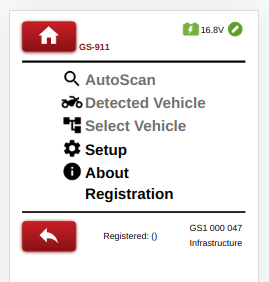
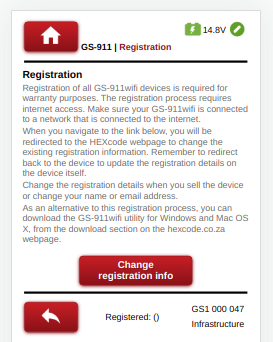
Configureer eerst het apparaat om verbinding te maken in Infrastructuurmodus zoals beschreven in hoofdstuk 4, registreer vervolgens het apparaat via de link [Registratie] in het hoofdmenu van de toepassing.
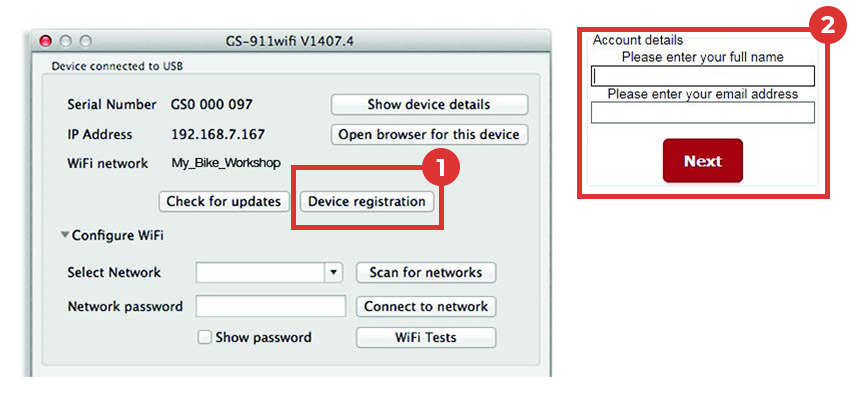
De GS-911wifi utility app zou een USB aangesloten apparaat moeten detecteren en het serienummer ervan moeten weergeven. De (1)[Device registration] knop opent de (2)registratiepagina in uw browser.
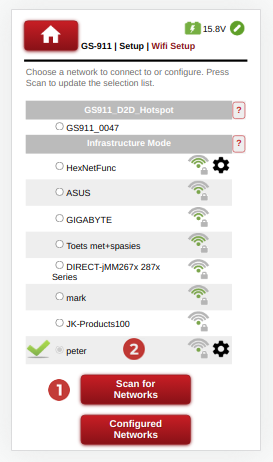
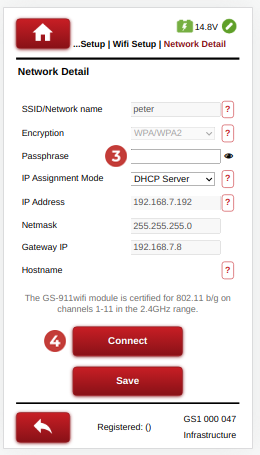
Navigeer naar Setup->Wifi Setup.
Druk op de knop (1)[Scan for Networks] om de gedetecteerde WiFi-lijst te vernieuwen of (2) kies het gewenste WiFi-toegangspunt.
Typ het vereiste (3) netwerkwachtwoord en selecteer de (4)[Connect] knop om verbinding te maken.
Zorg ervoor dat het GS-911 WiFi apparaat in D2D modus staat en verbind uw telefoon met het Access Point / Hotspot van het GS-911 apparaat. Het WiFi netwerk zal beginnen met GS911_ en eindigen met de laatste 4 cijfers van het serienummer van het GS-911 toestel.
Gebruik de GS-911 WiFi App om het GS-911 apparaat te lokaliseren of blader naar http://10.0.0.1.
Configureer een infrastructuurverbinding zoals bij de Diagnostic App.
In het venster van de GS-911wifi Utility app vouwt u de sectie [WiFi configureren] uit.
Klik op de knop (1) [Scan voor netwerken]. Alle (2) WiFi netwerken die zijn gevonden binnen het bereik van uw GS-911wifi apparaat zullen worden opgesomd. Selecteer uw netwerk SSID en voer het (3) WiFi netwerk wachtwoord in, klik vervolgens op de (4) [Connect to network] knop om lid te worden van dit netwerk.
Het bovenste gedeelte van de GS-911wifi Utility (5) toont het WiFi-netwerk waarmee uw toestel verbonden is.
De 'devices detected on WiFi section' (6) toont de serienummers en IP-nummers van alle aangesloten GS-911wifi-apparaten. Klik op de knop [Refresh device list] om een bijgewerkte lijst te zien. Selecteer vervolgens het apparaat om een browser te openen.



Voer een AutoScan uit met uw GS-911wifi als eerste diagnostische taak.
Bezoek ons YouTube-kanaal of de pagina met video's voor diverse instructievideo's.
Download de GS-911 Diagnostics applicatie van de Downloads pagina en voer deze uit.
De levensduur van elk GS-911 toestel begint met de registratie. Dit activeert uw toestel, markeert het begin van de garantieperiode en vereist een internetverbinding.
Voer een AutoScan uit met uw GS-911 als eerste diagnostische taak.
Bezoek ons YouTube-kanaal of de pagina met video's voor diverse instructievideo's.