
Welcome to BMW Tech Talk – your go-to series for exploring the clever technology tucked inside BMW motorcycles. From hidden features to smart tips and tricks, we’ll show you how to unlock the full potential of your bike and make every ride that little bit more exciting. Whether you’re a GS adventurer, a roadster rider, or simply curious about what your BMW can really do, you’re in the right place!
If you ride a BMW R1250GS or GS Adventure, you might be surprised to learn that your bike’s instrument cluster has extra display modes built in — but they’re hidden. These include alternative startup graphics, a lap timer, lean angle readouts, and even brake force data.
The problem? These options aren’t enabled from the factory. That means many riders never get to see, let alone enjoy, these features.
That’s where the HEX GS-911 Diagnostics & Configuration Tool comes in. With the GS-911, you can easily activate the BMW SPORT functionality on most R1250GS dashboards. No special dealer visit required. No waiting around for service appointments, no unexpected costs.
In just a few minutes, you can give your display a fresh new look and gain access to performance-focused information that enhances your riding experience.
The benefits go beyond the fun factor, too. By using the HEX GS-911 at home, you save valuable time and avoid any additional expense. Over time, the tool pays for itself, while also giving you the freedom to manage a wide range of diagnostic and configuration tasks whenever you like.
The HEX GS-911 makes it quick, simple, and affordable to unlock features you didn’t even know you had.
Whether you’re looking for extra split-seconds on the track, or you want a more engaging display, unlocking SPORT mode gives you that extra connection to your bike, and extra edge among your riding buddies.
If you’ve ever wondered whether your BMW’s display can work harder and do more – now you know. With GS-911, there’s always more to discover.
If you ride a BMW motorcycle with heated grips, you’ll know the familiar two-setting system — one often feels like overkill, while the other leaves your hands cold. It’s a classic case of compromise… but with the HEX GS-911 Diagnostics & Configuration Tool, that compromise disappears.
The HEX GS-911 allows you to unlock up to six separate heat levels for your BMW’s heated grips. Better yet, you can fine-tune the actual temperature for each level, creating the ideal setup for every ride and condition.
Whether you’re carving through frosty winter mornings or enjoying a crisp spring ride, you can set your heat precisely how you like it. And because all adjustments can be made directly via the HEX GS-911, there’s no need to visit a dealer or pay workshop fees — just plug in, configure, and ride.
This isn’t just a comfort upgrade; it’s about control. The HEX GS-911 empowers riders to tailor their bikes to their own needs — from diagnostics to convenience features — saving time, money, and effort in the process.
Anti-lock braking systems (ABS) are now standard on all modern BMW motorcycles, and they’re an essential part of rider safety. But there’s one detail that often gets overlooked: if the brake system is ever unsealed — for example, during a fluid change — air can enter. Once it does, it’s virtually impossible to remove the air completely by hand.
It’s important to use the right tools for the job. And with the HEX GS-911 Diagnostics & Configuration Tool, you can run the factory ABS bleed procedure in just a few minutes. This ensures the system is properly purged, leaving your brakes safe, sharp, and reliable.
The advantages go beyond safety, too. Running the ABS bleed procedure at home with your GS-911 saves you a trip to the dealer. No more waiting for service appointments, no more paying workshop fees for something you can do yourself. That means more time on the road, more money in your pocket, and complete confidence that your braking system is working as it should.
The HEX GS-911 doesn’t just give you control over diagnostics and customisation — it also helps you address the fundamentals that keep your bike safe.
It’s a straightforward way to make sure your motorcycle’s brakes are performing safely, so you can focus on the ride ahead.
La vida de cada dispositivo GS-911 comienza con el registro. Esto activa el dispositivo, marca el inicio del periodo de garantía y requiere una conexión a Internet.
Registre el dispositivo mediante el enlace [Registro] del menú principal de la aplicación y facilite sus datos de usuario en la ventana abierta del navegador.
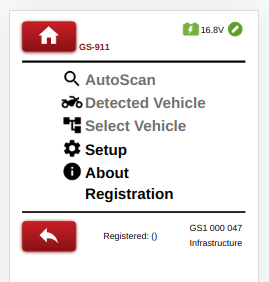
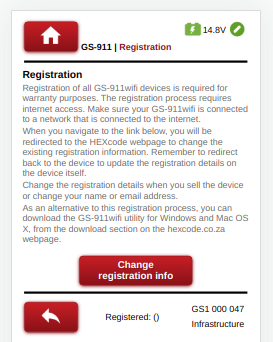
En primer lugar, configure el dispositivo para que se conecte en modo Infraestructura, tal y como se describe en el apartado 4. A continuación, registre el dispositivo mediante el enlace [Registro] del menú principal de la aplicación.
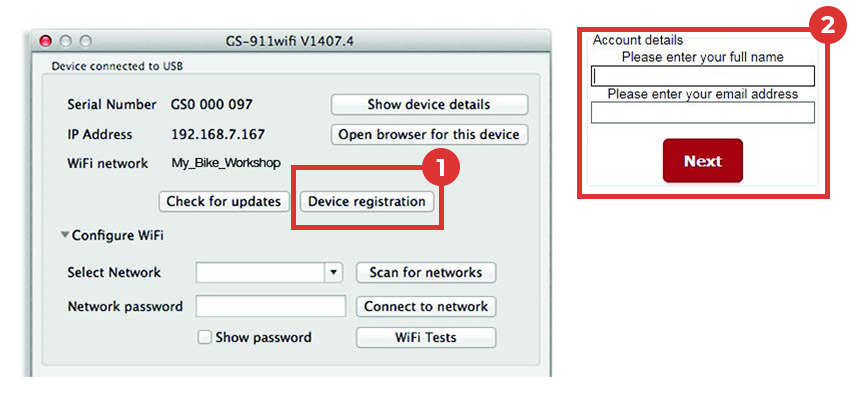
La aplicación de utilidad GS-911wifi debe detectar un dispositivo conectado por USB y mostrar su número de serie. El botón (1)[Registro del dispositivo] abre la (2)página de registro en su navegador.
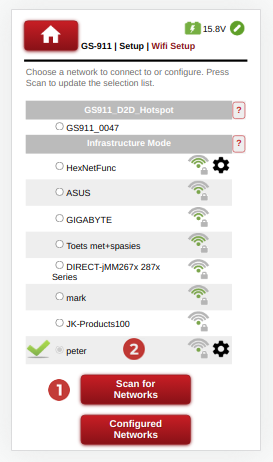
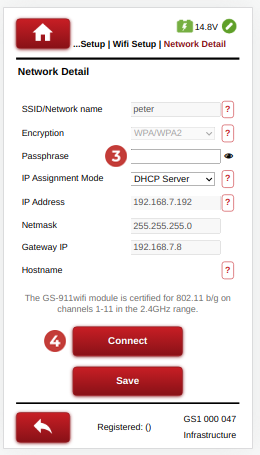
Navegue hasta Configuración->Configuración Wifi.
Pulse el botón (1)[Buscar redes] para actualizar la lista de WiFi detectadas o (2) elija el punto de acceso WiFi deseado.
Escriba la contraseña de red (3) necesaria y seleccione el botón (4)[Conectar] para conectarse.
Asegúrese de que el dispositivo GS-911 WiFi esté en modo D2D y conecte su teléfono al Punto de Acceso / Hotspot del dispositivo GS-911. La red WiFi comenzará con GS911_ y terminará con los últimos 4 dígitos del número de serie del dispositivo GS-911.
Utilice el GS-911 WiFi App para localizar el dispositivo GS-911 o navegar a http://10.0.0.1
Configure una conexión de infraestructura similar a la de la aplicación de diagnóstico.
En la ventana de la aplicación GS-911wifi Utility, expande la sección [Configure WiFi].
Haga clic en el botón (1) [Buscar redes]. Se enumerarán todas las ( 2) redes WiFi que se han encontrado en el rango de su dispositivo GS-911wifi. Seleccione su red SSID e introduzca la ( 3) contraseña de la red WiFi , a continuación, haga clic en el (4 ) botón [Conectar a la red] para unirse a esta red.
La sección superior de la Utilidad GS-911wifi (5) mostrará la red WiFi a la que está conectado su dispositivo.
La "sección de dispositivos detectados en WiFi" (6) mostrará los números de serie e IP de todos los dispositivos GS-911wifi conectados. Haga clic en el botón [Actualizar lista de dispositivos] para ver una lista actualizada. A continuación, seleccione el dispositivo para abrir un navegador.



Realice un Autoescaneo con su GS-911wifi como primera tarea de diagnóstico.
Visite nuestro canal de YouTube o la página de vídeos para ver varios vídeos instructivos.
Descargue la aplicación GS-911 Diagnostics de la página de descargas y ejecútela.
La vida de cada dispositivo GS-911 comienza con el registro. Esto activa el dispositivo, marca el inicio del periodo de garantía y requiere una conexión a Internet.
Realice un Autoescaneo con su GS-911 como primera tarea de diagnóstico.
Visite nuestro canal de YouTube o la página de vídeos para ver varios vídeos instructivos.